AI Sales Follow Up: Stop Ghosting Your Warm Leads
AI sales follow up for founder-sellers: score leads, fire triggers, draft the first touch, and call the right lead today — without burning your domain.
The Verdict: AI sales follow-up means letting software score your leads, draft the first-touch message, and trigger your next outreach when a lead behaves like a buyer — so you call the right person today instead of guessing. For a founder-seller, the win is fewer ghosted leads and time back in the day, not robot reps.
Critical Insights:
- A working AI sales follow-up system has four moving parts — a scoring rule, a trigger spec, a first-touch draft, and an escalation gate — and the cheapest combination runs inside the CRM you pay for today.
- The decision that matters most is which lead to call today, not how many emails you can send this week; scoring exists to surface that lead, automation exists to clear admin around the call.
- Every automated trigger needs a paired kill condition. Sequences without a stopping rule turn into spray-and-pray, burn your domain reputation, and train your buyers to ignore you.
- The replacement question is the wrong frame for an owner-operator: AI replaces the admin minutes between conversations, not the conversation itself.
- Practitioners building these systems lean on the voice-of-meeting pattern — record the call, transcribe, let AI draft the follow-up — rather than templated blasts to cold lists.
Your CRM has a ghost. The lead from week three asked for a proposal, went silent, and you forgot — and AI sales follow-up exists so this stops happening.
That lead was not cheap. It is now marketing spend converting to nothing because the founder-seller — you — ran out of Tuesday. Multiply across every warm lead this quarter. It is not a closing problem. It is an attention problem.
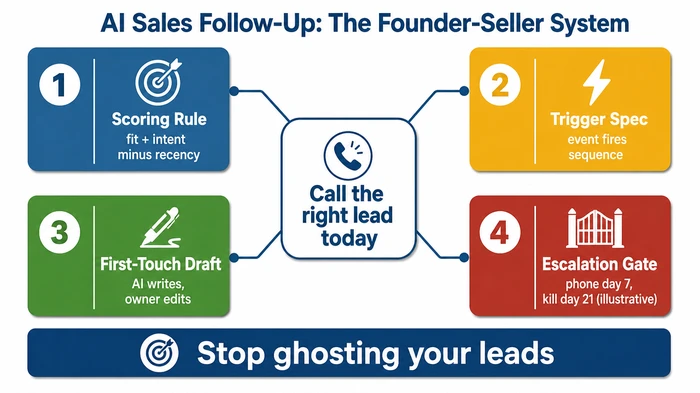
AI sales follow-up is not a robot SDR replacing you. It is a scoring rule plus a trigger plus a first-touch draft that surfaces which lead to call today and writes the email you were going to write anyway. This article is a working system, written for an owner who closes deals personally — and it sits inside our complete guide to AI for small business. The next several thousand words are the mechanics: the rule, the triggers, the tools, and the Monday-morning checklist that turns it into a routine.
What does “AI sales follow-up” actually mean for a small business?
Forget the vendor brochures. AI sales follow-up is software on top of your existing CRM data — it scores leads, fires triggers from buyer behaviour, and drafts the next message so the founder-seller spends time on conversations that close instead of inbox triage. It is a workflow layered onto the tools you pay for today, not a new department.
That definition does two things on purpose. First, it ties the practice to your CRM rather than to a vendor’s marketing copy. Second, it isolates four jobs the software actually does: scoring, triggering, drafting, and (with an owner gate) sending. Everything else marketed under the “AI sales” umbrella tends to be one of those four jobs in different clothes or a feature you do not yet need.
What it is not, just as importantly:
- Not an autonomous SDR. The owner remains the seller. The AI does not pick up the phone.
- Not a cold-email volume play. Sending many more templated emails from a single business domain is a deliverability suicide pact, not a strategy (see the warning further down).
- Not a CRM replacement. The AI lives on top of your CRM data; it does not displace the CRM.
The system has four components, and the cheapest combination of them runs inside the CRM the owner pays for today:
- Scoring rule — a deterministic formula ranking every lead on fit, intent, and recency.
- Trigger spec — a list of buyer-behaviour events (pricing-page visit, demo no-show, proposal opened) firing a sequence.
- First-touch draft — AI writes the body of the next email; the owner edits the opening and the ask.
- Escalation gate — explicit day-markers for moving from email to phone and, eventually, archiving the lead.
The argument across the rest of this article is that the four-component model beats both the “buy an enterprise SDR platform” advice and the “just write better emails” advice. It beats the platform advice because most owners do not have the budget or the volume to justify the platform. It beats the better-emails advice because the bottleneck tends to be knowing which lead deserves the email, not the email itself.
How do you automate sales follow-up with AI — the seven-step system?
Seven steps. Score every new lead within roughly one business day, tag the trigger that brought them in, let AI draft the first touch, edit and send it personally, branch on the response, escalate to phone if email goes silent for about a week, and kill or nurture at the three-week mark. The steps are sequential, but most run inside whatever CRM you use today.
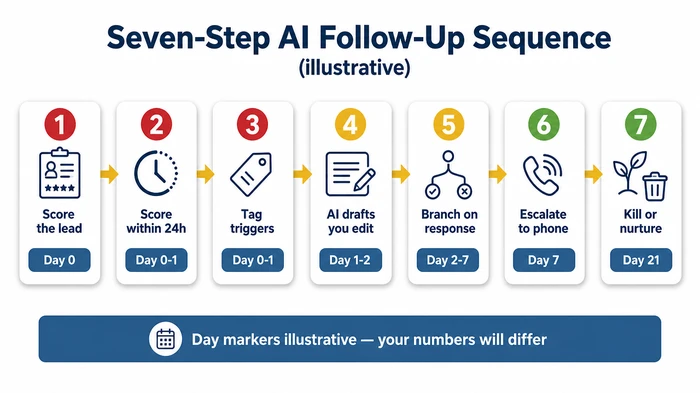
The seven steps in detail:
| Step | Action | Day marker | Reasoning |
|---|---|---|---|
| 1. Score the lead | Rate every new lead on fit (0-3) + intent (0-3) minus a recency penalty | Day 0 | You cannot prioritise what you have not scored. The scoring rule surfaces the leads worth your time and buries the rest. |
| 2. Score within 24 hours | Run the scoring rule on every inbound lead within one business day | Day 0-1 | Speed-to-lead — the elapsed time between a lead landing and your first response — is a high-leverage timing variable. A lead scored on day 1 and called on day 2 tends to convert at multiples of one scored on day 5. |
| 3. Tag triggers | Label each lead with its most recent trigger event (proposal sent, pricing-page visit, demo no-show) | Day 0-1 | Triggers tell you what happened — not just that the lead exists. A "proposal sent + 72h" trigger is a hotter signal than a generic "new lead" tag. |
| 4. AI drafts, you edit | AI writes the first-touch email; owner rewrites the opening sentence and the ask, then sends | Day 1-2 | The AI handles the body (context, recap, next steps). The owner's voice on the opening line and the specific ask is what tends to make it feel human. |
| 5. Branch on response | If replied, send a personal response. If opened-no-reply, queue a second touch in three days. If silent, wait for the day-7 escalation. | Day 2-7 | Not every lead deserves the same sequence. Branching prevents the spray-and-pray pattern killing deliverability and trust. |
| 6. Escalate to phone | If no email reply by day 7, call the lead directly. Reference the last email subject line. | Day 7 | Email has a ceiling. A phone call at day 7 catches leads who read but did not reply — often the ones closest to buying. |
| 7. Kill or nurture | If no response by day 21, archive the lead or move to a passive nurture list. Reallocate your time. | Day 21 | Every minute spent chasing a dead lead is a minute stolen from a live one. A kill condition is not giving up — it is protecting your pipeline. |
A useful comparator: monday.com publishes a 2025 framework, AI lead follow up: how to build a successful sales system, laying out a seven-step path covering broadly the same ground at higher altitude monday.com. The version above differs by tying every step to a day marker and an explicit kill condition — the operational discipline a vendor blog tends to skip.
The shortest description of the system is one paragraph long: score every new lead within 24 hours on three signals (fit, intent, recency), tag the trigger that brought them in, let AI draft the first touch, edit it before sending, branch on response, escalate to phone at day seven, and archive at day 21. If you can hold that sentence in your head on Monday morning, you have the system.
Which leads should you call today? A scoring rule you can run on Monday
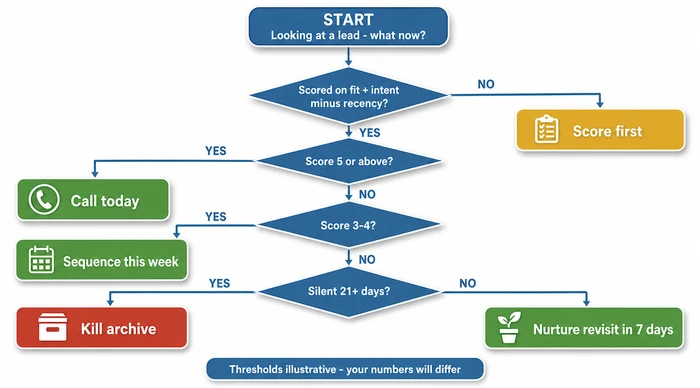
The lead to call today is the one with the highest fit + intent minus recency penalty score in your CRM right now. Run the rule on every new lead and on every silent warm lead, then call the top decile. The rule is intentionally crude — three integers — because a founder-seller will run a crude rule daily and an elegant model rarely.
The rule has three inputs and one decision threshold. Inputs are scored as small integers; the threshold maps the total to a Monday-morning action.
Fit (0-3) — how well does this lead resemble the customers you close today?
- 0: No fit (wrong industry, wrong size, wrong geography)
- 1: Loose fit (one of three signals)
- 2: Good fit (two of three signals)
- 3: Strong fit (industry, size, and geography all align)
Intent (0-3) — what has the lead done to signal buying motion?
- 0: Nothing observable
- 1: Website visit only
- 2: Pricing-page view or demo request
- 3: Email reply or verbal commitment
Recency penalty (0 to minus 3) — how cold has this lead gone?
- 0: Contacted within the past week
- minus 1: 7-13 days silent
- minus 2: 14-20 days silent
- minus 3: 21+ days silent
Total = Fit + Intent + Recency penalty. Range: minus 3 to plus 6.
The decision table:
| Total | Action |
|---|---|
| 5-6 | Call today — top decile |
| 3-4 | Sequence — AI drafts the first touch, you edit, queue for this week |
| 0-2 | Nurture — passive drip, revisit in seven days |
| Below 0 | Kill — archive and reallocate acquisition spend |
Use the interactive scorer below to run the rule on a real lead in your CRM:
The AI’s job in this rule is small but real: it watches the CRM and the email thread, increments the intent score when a buyer behaviour fires (a reply arrives, the pricing page is hit), and applies the recency penalty as days tick by. Your job is the call.
What triggers should fire an AI follow-up sequence?
A trigger is any buyer-behaviour event signalling a state change worth acting on. Two rules matter: every trigger maps to one specific AI-drafted action, and every trigger has a paired kill condition closing the loop if the lead does not respond.
The behavioural triggers worth firing on are short. Pricing-page visit (first time and second time within seven days are different events). Demo request submitted. Demo no-show. Proposal sent plus 72 hours of silence. Email reply (positive or negative). Second site visit in seven days without a demo request. That tends to cover it for a founder-seller — adding more triggers usually adds noise, not signal.
The negative triggers — the ones closing a lead — are simpler. Unsubscribe. Hard bounce. Explicit “not interested” reply. Each one should immediately remove the lead from active sequences. Unsubscribe handling carries a legal weight in most jurisdictions; bounce handling carries a deliverability weight nearly as serious.
The discipline most founder-sellers miss is the kill condition on every positive trigger. Without it, sequences pile up and the lead keeps receiving “just checking in” emails for six weeks while the owner is too busy to notice. The trigger map below pairs the most common five:
| Trigger event | AI-drafted action | Kill condition |
|---|---|---|
| Pricing-page visit (first time) | “Saw you checking pricing” email; owner edits and sends within 24h | Lead unsubscribes or replies “not interested” |
| Pricing-page visit (second time in 7 days) | Escalated email with a time-bound offer; owner sends same day | Lead does not open within 72h, downgrade to nurture |
| Demo request submitted | Owner calls within 1 hour; AI pre-drafts a confirmation email as backup | No show plus no reschedule within 48h, AI sends reschedule offer, then kill at day 7 |
| Demo no-show | AI sends reschedule email at plus 1 hour; owner follows up by phone at plus 24h | No response by day 7, kill |
| Proposal sent + 72h, no reply | AI drafts a “quick question about the proposal” email; owner personalises the ask | No open by day 10, phone call; no response by day 14, kill |
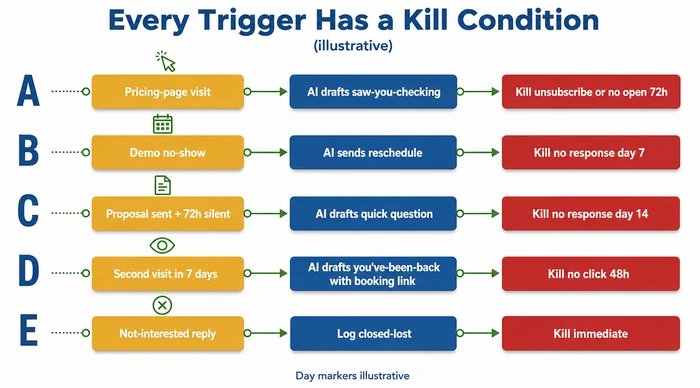
A trigger with no kill condition is not automation — it is an annoyance machine pointed at your warm leads. The trigger spec, the kill condition, and the scoring rule together are what keep the system from training your buyers to ignore you.
How do you write the first-touch email so it doesn’t sound like AI?
Write the opening sentence yourself. The first-touch email reads like the owner wrote it when AI writes the body and the owner writes the opening sentence and the ask. That habit, more than any other, fools a reader’s ear. Model selection, prompt engineering, and personalisation tokens sit downstream of it.
The pattern working hardest is what r/automation practitioners call voice-of-meeting: record the discovery call, transcribe it, feed the transcript and any CRM notes to the AI, and have it draft a follow-up quoting back the buyer’s actual words. A 2025 r/automation thread, I built an AI that automates follow ups from the meetings I’m in, describes that loop — capture, transcribe, draft — as the highest-leverage automation a small operator can build reddit.com. The follow-up reads like the call sounded because, structurally, it is the call.
The owner-edit gate is the second half. The AI handles maybe 80% of the email — context, recap, recommended next step, sign-off. You handle two specific bits: the opening sentence and the ask. The opening sentence is where the reader decides whether to keep reading; the ask is where they decide whether to act. Those are the two places where templated AI prose tends to die on first contact.
Three phrases flag AI to a reader fast enough you can almost see the email being marked unread:
- “I hope this email finds you well”
- “Just circling back”
- “I wanted to touch base”
None of them are AI’s fault — humans have written them for decades — but most readers have now seen them in templated cold sequences, and they have become a tell. Strip them before sending. Replace with a concrete reference to the last conversation (“You mentioned on Tuesday that the renewal lands in October — quick thought…”) and you are most of the way to sounding human.
Vendor positioning around drafting speed is enthusiastic. Momentum.io’s product page for Smart AI Email Follow-Ups claims its tool reduces follow-up writing time by up to 90% momentum.io. Treat that figure as a vendor self-claim ceiling rather than a benchmark — in practice, an owner who runs the draft-and-edit gate honestly will see something more modest, because the editing step is where the human voice goes back in.
Which AI tools actually fit a small-business budget?
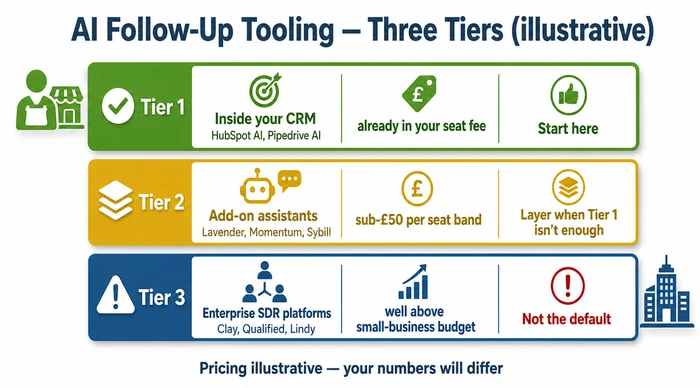
Start with what you already pay for. The tools fitting a founder-seller’s budget tend to be the AI features bundled into your CRM seat fee — start at Tier 1. Add-on assistants in the entry-tier per-seat price band are Tier 2 and worth layering only when Tier 1 cannot do the job. Enterprise SDR platforms (Clay, Qualified, Lindy) are Tier 3 and rarely the right default for a one-to-ten-person business.
The three tiers, with examples:
Tier 1 — Inside your existing CRM. HubSpot’s AI Sales features, Pipedrive’s AI Sales Assistant, Salesforce’s Einstein for small Salesforce instances, Zoho CRM’s Zia. You pay for the seat regardless. The AI scoring, draft-an-email, and trigger features are quietly bundled in. They are not the best-in-class assistants on the market, but their marginal cost to you is zero — and zero tends to beat most things in this category.
Tier 2 — Add-on assistants. Lavender (email coaching and rewriting), Momentum (follow-up drafting from CRM and call data), Sybill (call recording, summarisation, follow-up generation). These sit on top of your CRM and your inbox; per-seat pricing tends to fall in the entry-tier double-digit range, putting them inside a small-business budget when Tier 1 leaves a real gap (most commonly: call summarisation your CRM does not do well).
Tier 3 — Enterprise SDR platforms. Clay, Qualified, Lindy and the rest of the AI-SDR category. Lindy’s 2026 round-up, Top 10 AI Sales Automation Platforms, gives a useful map of this layer lindy.ai. Pricing on most of these starts well above the budget a sole founder or a five-person team can sensibly justify. Named here so you know what you are not buying. If you run a dedicated SDR or two, Tier 3 starts to make sense; if you are the SDR, it does not.
The cheap-fix instinct here is the right one. Turn on the AI features inside your CRM. Run them for a month against the scoring rule and trigger spec from the sections above. If — and only if — you hit a specific limitation (the CRM cannot summarise calls, or the draft quality is poor on long discovery threads), layer a Tier 2 add-on against that specific limitation. Do not layer add-ons because the dashboard looks nice.
Is AI going to replace sales reps?
No, not for founder-sellers — and not in a way that matters for the next several years. AI replaces the admin minutes between conversations: drafting, scoring, scheduling, summarising. It does not replace the conversation itself, and for an owner-operator the conversation tends to be the relationship moat.
The replacement narrative is the wrong frame for this audience. It is borrowed from the enterprise sales-tech category, where outbound SDR teams of 20+ people genuinely are being reshaped by AI-assisted prospecting and AI-drafted sequences at scale. Little of that maps to a small business where one human closes every deal personally. For that operator, the practical question is the time question: where does the AI give you back hours, and where does it not?
The honest answer is that AI gives you back the hours you spend on admin between conversations. That includes triaging which lead deserves attention, drafting the email you were going to draft anyway, summarising a discovery call so you remember the buyer’s actual words, and reminding you that a proposal has been sitting unanswered for 72 hours. It does not give you back the hours on calls, in proposals, or on the bits of selling where your relationship is the product.
If the AI tries to take the conversation itself — autonomously sending emails on your behalf without an edit pass, or worse, holding voice conversations as your proxy — push back hard. The reason your buyers reply to you is that you are the founder. They are not interested in talking to your software.
Variations and exceptions
High-ticket B2B (above roughly £10k annual contract value). More human touches, less automation. The AI scores and the AI surfaces — but it does not draft. A buyer about to wire you a five-figure cheque expects every touch to come from you personally. Restrict AI to the scoring and triggering layers only.
Low-ticket B2C or transactional purchases. Fully automated nurture is acceptable. The owner rarely writes a touch. The rule flips: AI drafts and sends the email; the owner reviews aggregate metrics weekly rather than reading individual sequences.
Regulated industries (legal, financial, healthcare). The owner signs every outbound. AI drafts only — sending stays manual, and compliance review may need to sit in front of the send. Audit trails matter; pick tools logging who edited what and when.
One-time purchase versus subscription. The kill condition differs. For a one-time sale, the kill is the closed deal; for a subscription, the kill is the renewal date, and the system loops back into a renewal sequence rather than archiving the lead.
If you sit in one of these four exceptions, the four-component model still holds — the scoring rule, the trigger spec, the first-touch draft, and the escalation gate — but the calibration changes. The common mistake is borrowing a B2C-style fully-automated sequence and pointing it at a B2B pipeline (or vice versa). Tune the level of automation to the level of buyer expectation, and you tend not to go far wrong.
The Common Mistake: Turning on an AI email tool and cranking follow-up volume to 10x — blasting every cold lead with a templated “just checking in” sequence three times a week because the AI can write them faster than you can.
Why It’s Dangerous: Your small business likely runs email from a single domain. If spam complaints rise — and they tend to, because recipients flag generic “circling back” emails as junk — your domain reputation suffers. Once your domain lands on a blocklist, the rest of your sending suffers too: invoices, client communications, proposals. Recovering a burned domain reputation can take weeks to months and may require a fresh domain. For a founder-seller with one domain, this is existential, not inconvenient. Vendor blogs pushing “send 10x more follow-ups” tend to be written for enterprises with dedicated sending domains and deliverability teams. You have neither.
The Expert Alternative: Use AI to score which leads are worth contacting and draft a single, well-targeted first touch — then stop. Your sequence should run a maximum of three touches across 21 days, each one progressively more specific to the lead’s actual behaviour (pricing-page visit, proposal open, demo no-show), and each one edited by you before it goes out. Quality over volume. One good email tends to beat ten templated ones.
Red Flags to Watch For:
- Your AI tool’s dashboard celebrates “emails sent” as the primary metric — this incentivises volume over relevance
- Your follow-up emails use phrases like “just checking in”, “circling back”, or “touching base” — these are spam-folder magnets and most recipients have seen them many times over
- You are contacting leads who have not engaged with your business in 30+ days — you are not following up, you are cold-emailing your own list
- Your open rates fall noticeably below your own baseline on follow-up sequences — this is the canary; if they keep dropping your domain is likely flagged
- You have not manually read and edited the AI draft before hitting send — if you would not send it written by hand, do not send it written by software
Frequently Asked Questions
Q: How do you automate sales follow-up with AI? Score every new lead within one business day on three signals (fit, intent, recency), tag the trigger that brought them in, let AI draft the first-touch email, edit the opening sentence and the ask before you send, branch the sequence on whether the lead replies, escalate to a phone call if there is no email reply after about a week, and archive the lead if there is no response at the three-week mark. The full mechanics — including a scoring rule you can run on Monday — are in the sections above.
Q: What’s the best AI to use for sales follow-up? Start with the AI features bundled into your CRM — HubSpot AI, Pipedrive’s AI Sales Assistant, Zoho’s Zia, or the equivalent in whichever CRM you use today. Layer an add-on (Lavender, Momentum, Sybill) only when you hit a specific limitation the CRM cannot address. Enterprise SDR platforms (Clay, Qualified, Lindy) are not the default for a founder-seller; their pricing assumes a real outbound team.
Q: Is AI going to replace sales reps? No — at least not for founder-sellers. AI replaces the admin minutes between conversations (drafting, scoring, summarising, scheduling). It does not replace the conversation itself. For an owner-operator whose relationship with the buyer is the product, the conversation is the relationship advantage. The replacement framing is borrowed from enterprise outbound teams and does not map onto a small business.
Q: What is the 3-3-3 rule in sales? The 3-3-3 rule is a heuristic some sales coaches teach for prospecting cadence: three touches across three channels within three days of a lead landing. It predates AI follow-up and is not specific to it. For a founder-seller, the system above is more useful: score first, fire on real buyer triggers, and let the scoring rule (not a fixed three-touch cadence) decide how aggressively to chase any given lead.
Q: How much do AI sales reps make? ZipRecruiter’s AI Sales Salary page reports a US 25th-to-75th-percentile range of about $53,000 to $96,500, with top earners around $136,500 ziprecruiter.com. Treat that as a US data point for human sellers working in AI-adjacent roles — it is not a founder-seller benchmark, and it does not represent the cost of running AI tooling. If you are an owner-operator, the relevant number is your hourly cost, not a salary band.
Q: Will AI eventually replace sales reps? For volume outbound roles in enterprise sales-tech, AI will keep absorbing tasks — research, list-building, first-touch drafting, basic objection handling. The conversation itself, the negotiation, and the relationship layer tend to resist automation in any timeframe a founder-seller needs to plan around. Frame the question as “what does the rep do with the hours AI gives back?”, not “is the rep still there in five years?”.
Conclusion: the Monday morning checklist
The whole system collapses to one routine. Open the CRM on Monday morning. Sort by last-contact date, oldest first. Run the scoring rule on every lead with no contact in seven-plus days. Call the top three. Let the AI draft the rest. The full checklist is below — pin it.
Monday Morning Lead Checklist
Before you open your inbox:
- Open your CRM and sort leads by last-contact date (oldest first)
- Run the scoring rule: fit (0-3) + intent (0-3) minus recency penalty for every lead with no contact in 7+ days
- Identify the top three scored leads — these are your calls today
First 30 minutes:
- Call the top-scoring lead. No script — reference the last conversation and make one clear ask.
- If no answer: let the AI draft a follow-up email using the voice-of-meeting pattern. Edit the opening sentence. Send.
- Repeat for leads two and three.
After the calls:
- Review AI-drafted sequences queued for this week — edit the opening line and the sign-off on each
- Check for new triggers since last Monday (pricing-page visits, demo no-shows, proposal opens)
- Archive any lead at day 21+ with no response and a score below 0
Validation:
- Confirm every warm lead has a next-touch date in the CRM (no orphan leads)
- Confirm no lead has gone 14+ days without a touch unless scored “kill”
That is the system. Scoring rule, trigger spec, first-touch draft, escalation gate — all of it serving one decision: which lead deserves your voice today. The AI handles the admin. You make the calls. Stop ghosting your leads.
For the broader context — where AI sales follow-up sits alongside the other systems a small business should be automating — start with our complete guide to AI for small business.
Sources
- monday.com — AI lead follow up: how to build a successful sales system (retrieved 2026-05-18)
- Reddit r/automation — I built an AI that automates follow ups from the meetings I’m in (retrieved 2026-05-18)
- Momentum.io — Smart AI Email Follow-Ups for Sales & Customer Success (retrieved 2026-05-18)
- Lindy.ai — Top 10 AI Sales Automation Platforms [2026]: Tested & Reviewed (retrieved 2026-05-18)
- ZipRecruiter — AI Sales Salary (retrieved 2026-05-18)
Founder, Too Many Hats
Free tool
What it's costing you
See how many hours your manual tasks are really costing you.
Free tool
Problem Solver
Describe your biggest timewaster and get a personalised plan.
Related Guides
AI Customer Service for Small Business: 3 Modes, 30-Day Path
AI customer service for a small business in three modes — deflection, routing, AI assist — plus the handover seam that protects quality. 30-day path.
How to Reduce Errors in Business Processes (Forensic Guide)
Reduce errors in repetitive business processes with a three-lever sequence: redesign, automate, protect. Scorecard, worked example, 5 rights pattern.
Hire or Systematize Your Business: Founder's Decision
Stuck choosing whether to hire or systematize your business? Use this 8-question decision matrix to pick the right move this week — not next quarter.