AI Customer Service for Small Business: 3 Modes, 30-Day Path
AI customer service for a small business in three modes — deflection, routing, AI assist — plus the handover seam that protects quality. 30-day path.
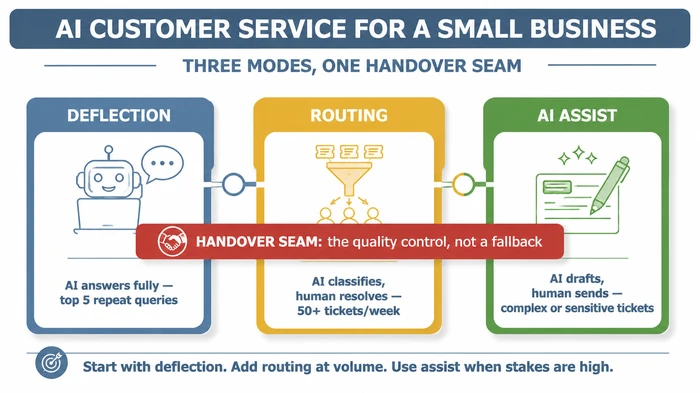
AI customer service for a small business works in three modes — deflection (AI answers fully), routing (AI sorts and prioritises), and AI assist (AI drafts a reply a human edits and sends). Start with deflection on your top repeat queries, add routing once mixed-volume tickets bury the complex ones, and protect quality with a named handover seam.
Critical Insights:
- The three-mode split is the decision that matters: deflection, routing, and AI assist are not interchangeable, and choosing the wrong mode for a ticket type is the most common small-team deployment error.
- The handover seam is the quality control, not a fallback — containment-rate targets without an explicit escalation trigger are how AI customer service quietly loses customer trust.
- AI can sort and route inquiries to the right person before it ever answers a customer, which shortens time-to-right-human even when no AI reply is sent.
- Most of the work sits in people and processes, not the model — the algorithm is the smallest slice; your knowledge base, escalation rules, and team review habits do the heavy lifting.
It’s Sunday night, and you’re still in the inbox answering the same question for the fortieth time this week. AI customer service for a small business can fix that — but only if you pick the right mode for each kind of ticket.
Underneath those repeat queries sit two refund disputes, a damaged-parcel complaint, and a wholesale enquiry waiting since Friday. The complex tickets are the ones paying the bills. They’re also the ones getting answered last and worst. Vendor demos promise an “AI agent handling 80% of your tickets”, peers say they’re “using AI now”, and a Sunday-Times piece warned the customer-expectation bar had moved. None of that tells you which AI fits which ticket, or where a human MUST stay in the loop. This guide answers both, and it sits inside our broader complete guide to AI for small business — start there for the wider stack.
Can I use AI for customer service in a small business?
Yes — in three distinct modes, and the first decision is which mode fits each kind of ticket you handle. Deflection lets AI answer a repeat query fully, with no human touch. Routing lets AI classify and prioritise so the right person picks the ticket up faster. AI assist lets AI draft a reply a human edits before sending. For a one-to-five-person team, the safest entry point is deflection on a small, well-defined set of repeat queries — typically order-status, opening hours, and returns-policy questions — with everything else still going to a person.
The reason this matters more for small teams than for large ones is exposure. A large brand can absorb a hundred mediocre AI replies inside a month; a small business cannot. Every customer touch carries disproportionate weight, which is why the three modes are not a menu to pick one from — they’re tiers you apply to different ticket types within the same inbox. The mistake we watch teams make most often is treating “AI customer service” as a single switch they flip on at the website level.
Three quick definitions before going further: deflection means AI fully resolves the query; routing means AI classifies and a human resolves; AI assist means AI drafts and a human sends. Zendesk’s 2026 AI in customer service: Benefits, uses + best practices guide makes the qualitative case for automating routine inquiries to reduce cost without removing humans from the loop — useful framing for the deflection tier, and the source we lean on when scoping the first set of repeat queries zendesk.com.
The three modes: deflection vs routing vs AI assist
Match the ticket type to the mode, not the other way round. Vendors will sell you a tool first and ask about your tickets second; reverse the order. Each mode in plain terms below.
Deflection — AI answers, customer never sees a human
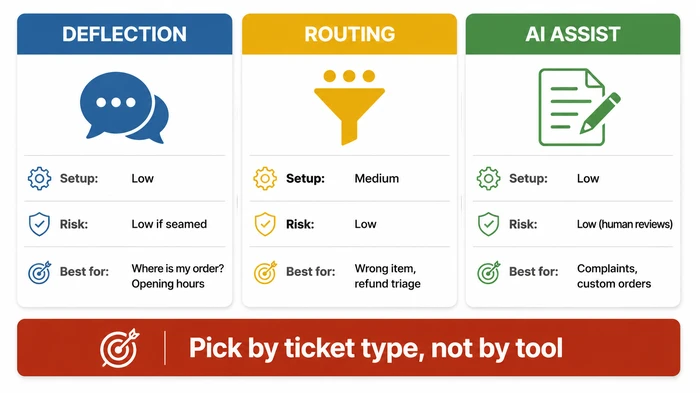
Deflection is the mode most people picture when they hear “AI chatbot”, but it only earns its place on queries meeting three conditions: the answer is always (or nearly always) the same, the question comes in often, and a wrong answer would not cause real harm. Where is my order? meets all three. I want a refund does not. The payoff on the right queries is large because you compound time saved against ticket volume — and the risk is small because the worst case is the customer asking again or being escalated.
Routing — AI classifies and prioritises; human resolves
Routing is the quiet workhorse of the three. The AI never sends a reply to the customer; it reads the incoming ticket, tags it with a category (refund, damage, wholesale, billing), and pushes it to the right person or the right priority queue. IBM’s AI in customer service topic guide makes the case for machine-learning models sorting customer inquiries and routing them to the best person or team using predictive analytics — meaning even before any AI answers a customer, it can shorten time-to-right-human ibm.com. For mixed inboxes where the complex tickets keep getting buried under the simple ones, routing is the lever to pull before deflection.
AI assist — AI drafts, human edits and sends
AI assist is the third mode and the one small teams under-use. The AI generates a draft reply pulling from your product specs, past replies, and your knowledge base; the human reads it, edits the tone, and sends it. The customer interacts with a person every time. This mode shines on complaints, custom-order enquiries, and anywhere your voice matters — the AI does the typing, you keep the judgement.
Which AI is best for customer service in a small business?
It depends on which of the three modes you need first, and that depends on the tickets you actually handle. There’s no single “best” tool, but there is a clean way to map categories to needs.
For deflection, the practical choices fall into three buckets: a helpdesk-native AI add-on (your existing inbox tool ships an AI layer you switch on), a standalone deflection bot pointed at your knowledge base, or an AI-powered FAQ widget on your site. The helpdesk-native option is usually the lowest-friction starting point because the routing wiring already exists. For routing, look for the same tier of helpdesk AI but specifically the classification and triage features, not the auto-reply features. For AI assist, the lightest option is often a draft-mode toggle inside your existing helpdesk or a browser plugin drafting replies from your knowledge base — no platform migration required.
A UK-specific note US listicles routinely miss: VAT inclusion. Most vendor pricing pages quote ex-VAT figures in USD, and when you sit on a £-denominated budget for a five-person team, the gap between ex-VAT USD and inc-VAT GBP can swing the cheapest-option decision by a tier. When you compare tools, normalise to inc-VAT GBP per active agent per month before you compare anything else — it’s the single biggest source of “we picked the wrong tool” regret we see.
Use the interactive scorer below to map a single ticket type to a mode before you go shopping for software:
If JavaScript is off, the same logic in a lookup table:
| Frequency | Time per reply | Consistency | Error risk if AI answers alone | Recommended mode |
|---|---|---|---|---|
| Daily or more | Over 5 min | Always the same answer | No real harm | Deflection |
| Weekly | 5–15 min | Usually the same | Minor rework | Deflection (with monitoring) |
| Weekly | Over 15 min | Varies | Customer could be upset | Routing |
| A few per month | Any | Varies | Relationship damage possible | AI assist |
| Rare / bespoke | Any | Varies | High — refund, complaint, account | AI assist → human |
How do you start without losing quality? The 30-day path
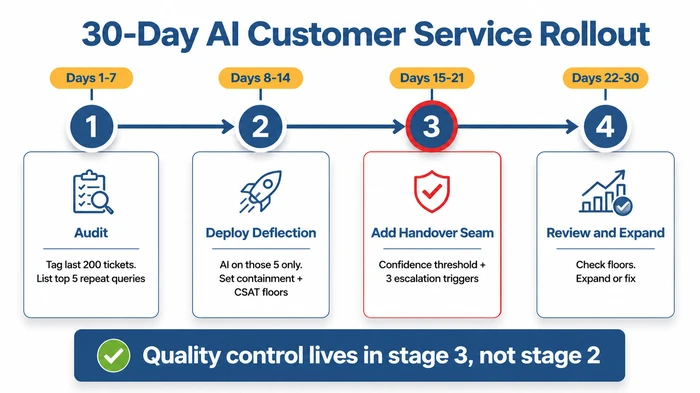
Compress the rollout into four weeks with a single clear sequence — audit, deploy on a small set, install the handover seam, then review before expanding. Most of the work in the four weeks sits outside the algorithm itself.
A useful frame here comes from Boston Consulting Group’s The Leader’s Guide to Transforming with AI, which describes a 10-20-70 rule for AI transformation: 10% of the value comes from algorithms, 20% from technology and data, and 70% from people and processes bcg.com. The 70% — your knowledge base, your handover rules, your team’s habit of reviewing AI replies — is where small-business deployments succeed or fail. The 30-day path below puts most of its weight there.
Days 1–7: Audit your repeat queries
Export or screenshot a recent batch of tickets — a few hundred is plenty for a small team. Tag each one as either repeat query, complex, or other. List the most common repeat queries by volume. For each, confirm a written answer document already exists; if it does not, write one before moving on. The deflection layer is only ever as good as the docs you point it at.
Days 8–14: Deploy deflection on a small set
Pick one AI layer — helpdesk-native add-on, a standalone deflection bot, or an FAQ widget. Connect it to the answer documents for your repeat queries only. Do not point it at your entire website yet; web content is full of marketing copy, blog posts, and outdated policy pages, and AI confidently quoting any of them is exactly the failure mode this stage avoids. Set two floors: a containment-rate floor (the share of these specific queries you expect AI to resolve without human touch) and a CSAT floor (your minimum acceptable satisfaction on AI-answered tickets). The numbers themselves matter less than the discipline of having both.
Days 15–21: Install the handover seam
Define your confidence threshold — the score below which the AI MUST escalate. List the sensitive intents always escalating regardless of confidence: refund requests, formal complaints, account-access issues. Wire “speak to a human” as an instant-escalation phrase. Write the handover message the customer sees when this fires, and test the seam by sending a handful of edge-case queries to confirm each escalates correctly.
Days 22–30: Review and expand
Pull the numbers. Containment rate at or above your floor? CSAT at or above your floor? First-contact resolution stable or up? If both floors are met, add the next handful of repeat queries to the deflection set. If either floor is missed, diagnose the failing queries — usually a bad source document, a confidence threshold set too low, or a question turning out to be genuinely ambiguous — and fix before expanding.
What is the handover seam, and why is it the quality control?
The handover seam is the explicit moment AI stops handling a ticket and a person takes over. It’s the quality control of the system, not a fallback for when the AI gives up. The seam is what stops a containment-rate target from becoming a vanity metric — without it, “AI resolved 80% of tickets” can mean “AI sent 80% of customers away with a mediocre answer”. Three triggers, all non-negotiable: confidence below your defined threshold, sensitive intent detected (refund, complaint, account access), and explicit “speak to a human” request from the customer.
In our experience working with small teams, the seam is the part skipped in the demo and bolted on after the first complaint. The pattern we see most often: deflection goes live in week one, the team is delighted with the volume drop, then a refund query gets a cheerful auto-reply on a Saturday and Monday morning is spent rebuilding a relationship. The seam is not a feature to add later — it’s the gate deciding whether deflection is safe to run at all.
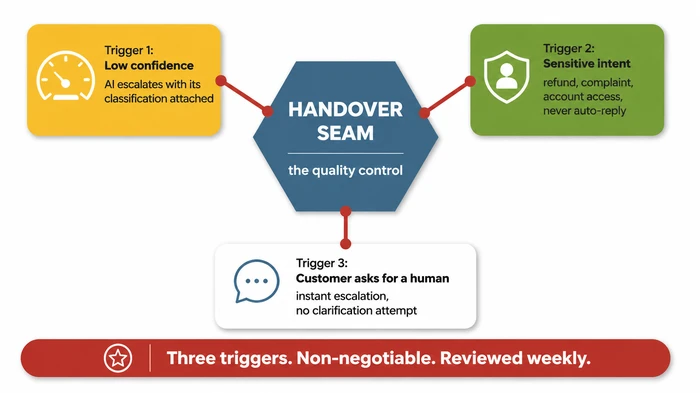
A worked example of the discipline. Suppose your AI handles order-status questions and a customer writes: “My order has not arrived and I want my money back.” Confidence on the order-status part is high; the refund intent is sensitive. The seam should fire on the refund signal, escalate the ticket to a person, and attach the AI’s classification (order number, customer history, refund intent detected) so the human starts ahead. The customer never gets a wrong auto-reply, and the human resolves a triaged ticket instead of a cold one. That’s the seam doing its job.
The decision matrix below, lifted from the same logic, maps common ticket types to the right mode and shows where the seam should fire by default:
| Ticket type | Frequency | Consistency | Stakes if wrong | Recommended mode | Why |
|---|---|---|---|---|---|
| “Where’s my order?” | Very high | Always the same answer | Low — customer just wants the status | Deflection | High volume + predictable answer = highest ROI from automation |
| “What are your opening hours?” | High | Always the same | Negligible | Deflection | Purely informational, zero judgement needed |
| “How do I reset my password?” | Medium–high | Usually the same | Low–medium | Deflection (fallback to routing if account locked) | Standard procedure, but edge cases (compromised account) need a human |
| “I received the wrong item” | Medium | Varies (wrong item, missing item, damaged) | Medium — customer is already frustrated | Routing | Needs classification then human judgement for resolution |
| “I want a refund” | Medium | Varies by reason and amount | High — money and trust | Routing → human | AI can triage (order number, reason, amount) but resolution requires judgement |
| “Custom order enquiry” | Low | Varies significantly | Medium–high | AI assist | AI drafts pulling product specs; human edits for tone and feasibility |
| “Complaint about service” | Low | Varies significantly | Very high — relationship risk | AI assist → human | AI should never auto-reply; draft-only, human reviews and sends |
| “Account access issue” | Low | Varies | Very high — security | Routing → human (no AI draft) | Security-sensitive; AI classifies urgency, human handles entirely |
How much does AI customer service cost a UK small business?
Cost depends on which mode you start with and how much ticket volume you push through it — there’s no single sticker price mapping to “small business”. The honest range is wide, and the variable dominating is whether you bolt AI onto your existing helpdesk (cheapest, usually included or a small add-on per seat) or buy a standalone AI layer (more capability, more cost). Always normalise vendor quotes to inc-VAT GBP per active agent per month before comparing.
A worked example to anchor the shape of the spend. Suppose your team handles a moderate monthly ticket volume and you want to put deflection on a handful of repeat queries. Plug in your own numbers from your helpdesk export: the variables actually moving the bill are seat count, message volume on the deflection bot, and whether you need a separate knowledge-base tool to host the answer documents. Most small teams find the first-year cost dominated by team time spent on the 70% — writing the answer docs, configuring the seam, reviewing CSAT — not by software. The British Business Bank’s AI trends — how AI can help small businesses guide makes the qualitative case the SMB benefit cluster is improved productivity, reduced costs, and boosted customer satisfaction — and notes those gains come from process work, not from buying a model british-business-bank.co.uk.
If you’re deciding between two tools looking similar on paper, the question to ask the vendor is not what does it cost? but what does it cost when we hit our containment-rate floor and want to expand to twice the query set? The pricing model punishing you for expanding is the one to avoid, because expansion is the whole point.
Variations and exceptions
Most of this guide assumes a one-to-five-person team running a B2C or light-B2B operation. Four cases need a different starting move.
Regulated industries (finance, health, legal). Use AI assist only on customer-facing replies until a human-review process is documented and tested. Regulatory liability sits with the business, not the model. Deflection mode is the wrong starting point because an unreviewed AI reply on a regulated topic is the thing the regulator cares about.
Single-founder businesses with no team. Start with AI assist (drafts), not deflection. You need leverage — a faster way to write replies — not absence. Deflection removes you from the loop entirely, which is risky when there’s no second pair of eyes on quality. Once you have a second person fielding tickets, revisit deflection on the obvious repeat queries.
High-trust premium brands. Use deflection on operational queries (order status, opening hours, returns policy) only. Never on relationship queries. The brand promise of a premium product is partly the promise of a human at the other end when it matters — deflection on a complaint reads as cheapness, not efficiency.
B2B with long sales cycles and low ticket counts. Routing-first; deflection is low-value when ticket count is low and the stakes per ticket are high. AI assist for drafting the long, technical replies is often the higher-leverage use of the same budget.
The common mistake: Turning on an AI chatbot, pointing it at your website homepage, setting a containment-rate target high, and walking away. This is the default deployment path most vendors demo — and it’s exactly wrong for a small team. The AI confidently answers questions it should not, fabricates policies that do not exist, and auto-replies to a complaint with a cheerful “Great question!” infuriating the customer.
Why it’s dangerous: For a one-to-five-person team, every customer interaction carries disproportionate weight. A large brand can absorb many bad AI replies; a small business cannot. When AI handles a refund query with wrong information, or replies to a complaint without empathy, the customer does not blame “the AI” — they blame your business. Trust lost in one interaction is trust you may not get back. Containment rate without a CSAT floor and a handover seam is a vanity metric: it measures how often the AI answered, not how often it answered well.
The expert alternative: Start with deflection on a small set of repeat queries only. Point the AI at your written answer docs, not your entire website. Set two floors — containment rate AND customer satisfaction — and refuse to expand until both are met. Add an explicit handover seam with three non-negotiable escalation triggers: confidence below threshold, sensitive intent detected (refund, complaint, account access), and explicit “speak to a human” request. Review the numbers weekly for the first month.
Red flags to watch for:
- Containment rate is climbing but CSAT on AI-answered tickets is dropping — the AI is answering more questions badly.
- Customers are typing “speak to a human” more often than before you deployed AI — they’ve learned the AI cannot help.
- The AI is answering questions you never gave it source material for — it’s fabricating from general web content or training data.
- Your team is spending more time fixing AI replies than they saved — the mode is wrong (should be routing or assist, not deflection).
- No one on the team can explain what the confidence threshold is set to or where it escalated last week — you’ve lost visibility of the seam.
FAQ
Q: What is the 10-20-70 rule for AI? The 10-20-70 rule, from Boston Consulting Group’s The Leader’s Guide to Transforming with AI, describes how value from AI transformation breaks down: 10% comes from the algorithm itself, 20% from technology and data, and 70% from people and processes bcg.com. For small-business customer service, the 70% is your knowledge base, your handover seam, and your team’s review habit.
Q: What is the 30% rule in AI? The 30% rule, articulated by Golabs Tech in What is the 30% rule for AI, describes a working ratio in which AI handles roughly 70% of repetitive or preparatory work while humans retain around 30% for oversight, creativity, and judgement golabstech.com. It sits comfortably alongside the 10-20-70 framing — one describes value distribution, the other describes task distribution.
Q: Can ChatGPT make a CRM? No, but it can sit on top of one. ChatGPT and similar large language models do not store structured customer records, manage pipelines, or enforce data integrity — those are CRM jobs. They can draft replies, summarise long ticket threads, and triage incoming messages when wired into a CRM you already use. The CRM does the storage; the AI does the writing.
Q: Can AI help small businesses compete with larger brands? Yes — and the framing matters. Community discussion on r/business frames AI customer service as a levelling tool rather than a cost-cut, with small businesses using AI to match the response times and consistency larger brands fund with headcount reddit.com. The competitive gain is on the speed and consistency axis, not the price axis.
Conclusion
Three modes, one handover seam. Deflection answers fully, routing classifies and prioritises, AI assist drafts for human review — and the seam between AI and human is the quality control deciding whether any of it earns customer trust. If you take one action this week, audit your last few hundred tickets and list the top repeat queries by volume. Everything else in the 30-day path follows from that list. For the broader context — automation across operations, finance, marketing — the parent guide to AI for small business walks the rest of the stack.
Sources
- Boston Consulting Group — The Leader’s Guide to Transforming with AI (retrieved 2026-05-12)
- IBM, AI in customer service (Think topic), retrieved 2026-05-12, https://www.ibm.com/think/topics/ai-in-customer-service
- Zendesk — AI in customer service: Benefits, uses + best practices (retrieved 2026-05-12)
- British Business Bank — AI trends — how AI can help small businesses (retrieved 2026-05-12)
- Golabs Tech — What is the 30% rule for AI (retrieved 2026-05-12)
- r/business community thread — How Small Businesses Are Using AI to Automate Customer… (retrieved 2026-05-12)
Founder, Too Many Hats
Free tool
What it's costing you
See how many hours your manual tasks are really costing you.
Free tool
Problem Solver
Describe your biggest timewaster and get a personalised plan.
Related Guides
AI Sales Follow Up: Stop Ghosting Your Warm Leads
AI sales follow up for founder-sellers: score leads, fire triggers, draft the first touch, and call the right lead today — without burning your domain.
How to Reduce Errors in Business Processes (Forensic Guide)
Reduce errors in repetitive business processes with a three-lever sequence: redesign, automate, protect. Scorecard, worked example, 5 rights pattern.
Hire or Systematize Your Business: Founder's Decision
Stuck choosing whether to hire or systematize your business? Use this 8-question decision matrix to pick the right move this week — not next quarter.